Supersoft Admin Console
Privacy Policy — Data Access, Usage, Security and Retention
Last updated: November 11, 2026
This Privacy Policy applies to the Supersoft Admin Console application (the “App”), developed and operated by SUPERSOFT INFOLINE LLP (“Supersoft”, “we”, “us” or “our”).
This policy explains what information the App accesses, why we access it, how we protect it, and the choices available to both the administrators who use the App and the customers whose purchase records are shown in it.
1. Information We Collect About Administrators
To control who can access the App, we collect a small amount of information about each administrator:
- Account information: the email address, profile name and profile photo associated with the Google account used to sign in. We use these to verify your identity and confirm that you are authorized.
2. Customer Information Displayed in the App
The App does not collect information directly from customers. It displays purchase records that were already created when customers bought Supersoft products through our website, apps or authorized payment channels. Depending on the purchase, a record may include:
| Category | Examples |
|---|---|
| Customer identity and contact details | Name, email address, phone number, billing address or location |
| Purchase details | Product or plan purchased, order ID, purchase date, quantity, price, taxes and currency |
| Payment status | Transaction reference, payment method type (e.g. card, UPI, store billing), paid, pending, failed or refunded status |
| License and activation | License or activation key, subscription period and the device identifiers linked to a license |
3. How We Use This Information
Customer purchase information is accessed through the App only for legitimate business purposes, including:
- Confirming purchases and issuing, activating or restoring licenses.
- Responding to customer support requests and resolving billing questions.
- Processing refunds and cancellations in line with our Return and Refund Policy.
- Detecting and preventing fraud, payment abuse and unauthorized license use.
- Accounting, tax reporting and meeting legal obligations.
- Preparing aggregated sales reports for internal business planning.
We do not use customer information viewed in the App for advertising, and we do not sell it to anyone.
4. Access Controls and Administrator Responsibilities
Access to customer data is limited to people who need it to do their job. Every administrator agrees to:
- Use customer information only for the purposes listed in Section 3.
- Not copy, export, screenshot, download or share customer records outside Supersoft's approved systems, except where required for a specific support or legal task.
- Keep sign-in credentials private and never share an account with another person.
- Sign out of the App and lock the device when it is not in use.
- Report any suspected data breach, lost device or unauthorized access to Supersoft immediately.
Misuse of customer information may lead to the account being suspended or revoked, and to further action as permitted by law.
5. How We Share Information
We share information only when necessary, and only with:
- Service providers who host our databases and infrastructure (for example, Google Firebase / Google Cloud), under agreements that require them to protect the data.
- Payment providers, to verify transactions or process refunds.
- Authorities, when required by law, court order or to protect the rights, property or safety of Supersoft, our customers or others.
6. Data Security
We use reasonable technical and organizational safeguards to protect information accessed through the App, including:
- Encrypted connections (HTTPS/TLS) between the App and our servers.
- Authenticated sign-in and role-based access rules, so administrators only see the data their role allows.
- Periodic review of administrator access.
- Prompt removal of access when an administrator leaves or no longer needs it.
No method of transmission or storage is completely secure, but we work to protect your information and will respond quickly to any security incident.
7. Data Retention
- Customer purchase records are kept for as long as needed to provide licenses and support, and to meet accounting, tax and legal requirements.
- Administrator account information is kept while the administrator has access, and is deleted when the account is deleted (see Section 9).
When information is no longer needed, we delete it or make it anonymous.
8. Your Rights
Customers
If you bought a Supersoft product, you may ask us to access, correct or delete your personal information, subject to records we are legally required to keep (such as invoices). The privacy policy of the Supersoft app or service you purchased also applies to your data.
Administrators
You may ask to see the account information we hold about you. You can delete your account at any time from within the App, as described in Section 9.
To make any request, contact us using the details in Section 12.
9. Deleting Your Account
You can permanently delete your account from inside the App:
- Sign in to the Admin Console.
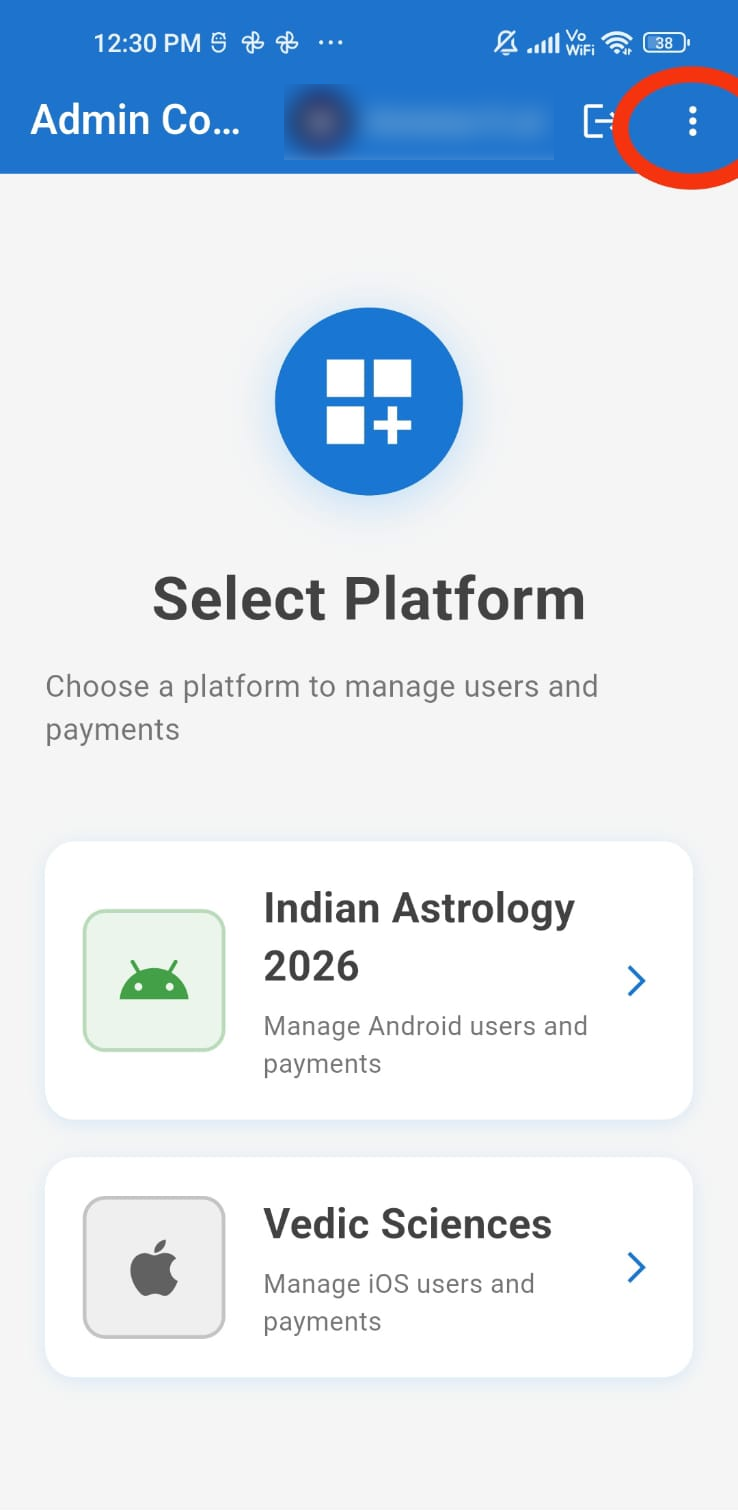
- On the Select Platform screen, tap the ⋮ (menu) icon at the top right and choose Delete Account.
- Read the information shown, then type DELETE in the confirmation box.
- Tap Delete my account.
- Choose your Google account again when asked, to confirm it is you. Your account is then deleted.
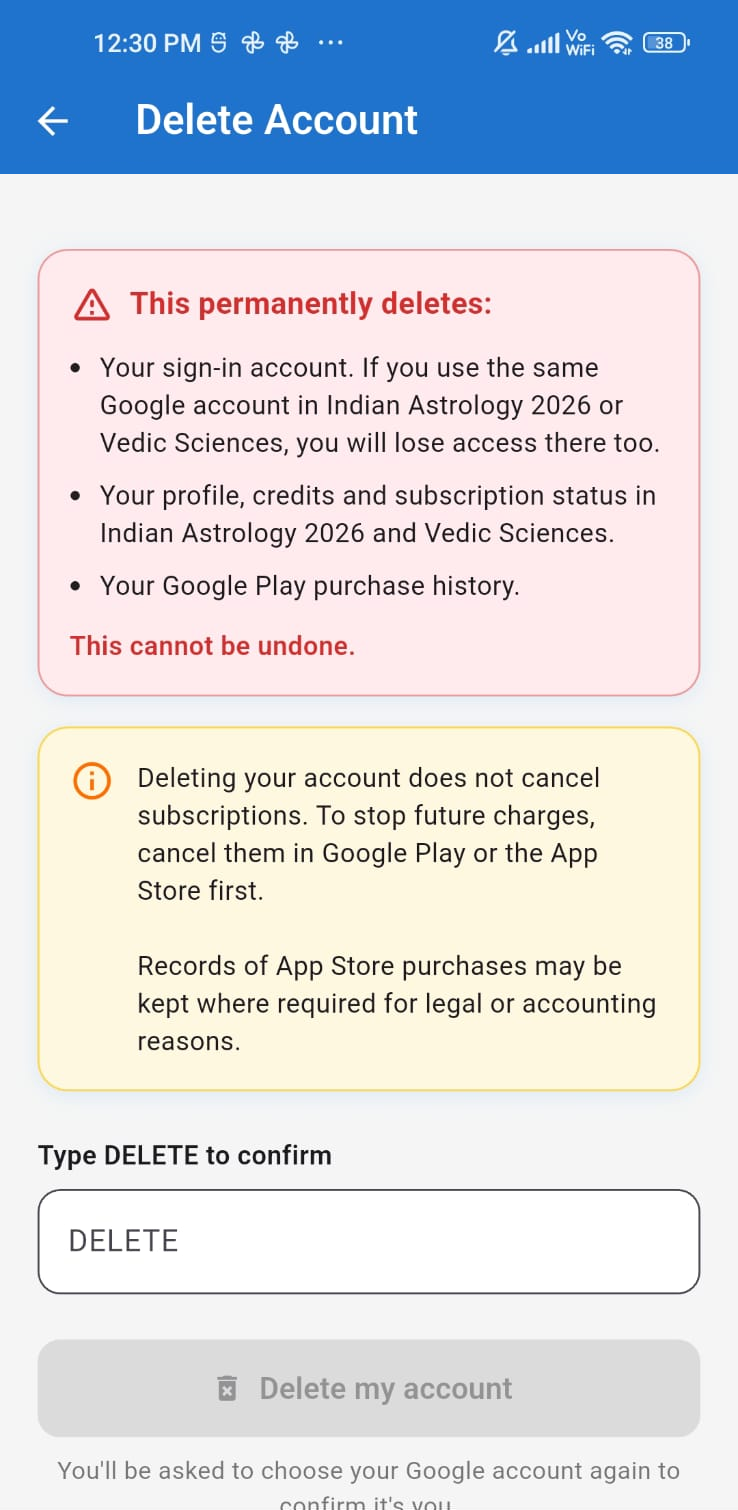
- Your sign-in account. If you use the same Google account in Indian Astrology 2026 or Vedic Sciences, you will lose access there too.
- Your profile, credits and subscription status in Indian Astrology 2026 and Vedic Sciences.
- Your Google Play purchase history.
Deleting your account does not cancel subscriptions. To stop future charges, cancel them in Google Play or the App Store first.
Records of App Store purchases may be kept where required for legal or accounting reasons.
If you can no longer sign in to the App, you can ask us to delete your account by emailing info@supersoftweb.com from the email address linked to your account, with the subject “Admin Console account deletion request”.
10. Children's Privacy
The App is for authorized adult staff only and is not intended for anyone under 18 years of age. We do not knowingly allow children to use the App.
11. Changes to This Policy
We may update this Privacy Policy from time to time. When we do, we will change the “Last updated” date at the top of this page. Significant changes will be communicated to administrators within the App or by email.
12. Contact Us
If you have questions about this Privacy Policy or how your information is handled, please contact:
SUPERSOFT INFOLINE LLP
Email: info@supersoftweb.com
Phone: +91 8921502570
Website: https://supersoftweb.com
© Copyright Supersoft Infoline LLP 2026